
Gershwin on GhostBSD: A Retro Future Built on GNUstep
Gershwin on GhostBSD: A Retro Future Built on GNUstep
Every now and then, something shows up in the open-source world that feels less like a new project and more like a glimpse into an alternate timeline.
Gershwin, introduced in GhostBSD 25.02-R14.3p2, is exactly that.
It doesn’t try to look like Windows. It doesn’t try to look like GNOME. It doesn’t even try to look like modern macOS.
Instead, it looks like OS X, or even NeXTSTEP, a design language that disappeared years ago, and that’s precisely what makes it interesting.
GhostBSD Takes a Different Turn
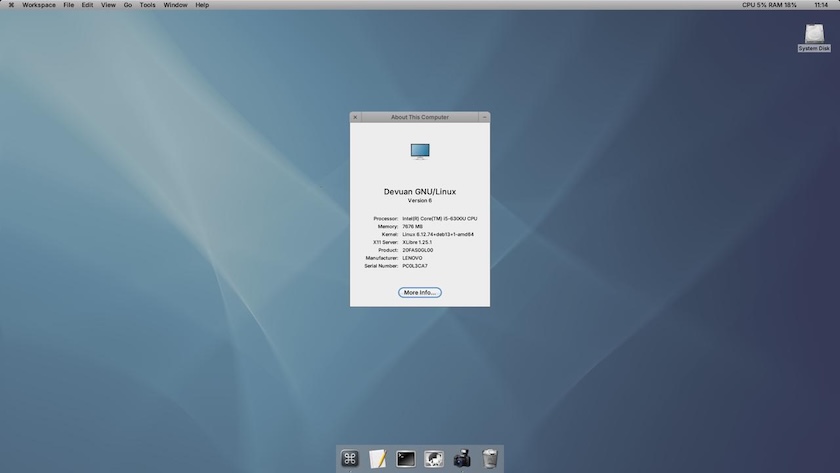
Gershwin breaks from that mold.
It’s still unclear to me whether it’s meant to replace existing environments or simply exist alongside them, but either way, it signals a shift in direction. This shift becomes even more interesting when viewed alongside the broader changes happening in the Linux and BSD desktop space, particularly the ongoing move from X11 to Wayland1.
This transition has been anything but smooth:
- X11 is aging, but stable and well-understood
- Wayland brings modern features and improvements
- Accessibility and workflow gaps still exist
- Performance varies depending on hardware
From my own experience, that divide is very real.
On newer hardware, in my case, an AMD 5600G with 64GB of RAM, Wayland works nearly perfect. No major complaints.
But on older or lower-powered systems? Completely different story.
On a 2011 iMac, an Intel N200 mini PC with 8GB of RAM, and even a Raspberry Pi 5, Wayland felt noticeably sluggish. Switching to X11 made an immediate and significant difference.
Gerswhin doesn’t feel like a typical desktop environment, it feels like a revival of a different path desktop computing could have taken.
The Look: Straight Out of the Aqua Era
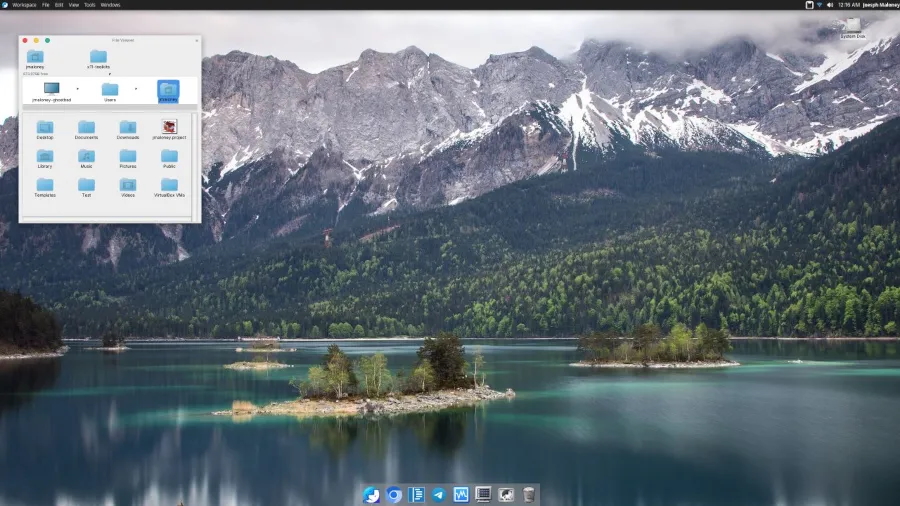
- Dock at the bottom
- Global menu at the top
- Clean, uncluttered desktop
If you’ve ever used OS X Tiger or Leopard, it immediately clicks.
But let’s be precise:
This feels like OS X, not macOS.
And that distinction matters.
OS X, as a concept, effectively ended in 2016 when Apple rebranded to macOS and shifted toward flat design, translucency, and iOS-inspired UI patterns. Gershwin exists firmly in that earlier era.
Retro? Yes. Outdated? Possibly. Intentional? Almost certainly.
Built on GNUstep — The Ghost of NeXT
At the heart of Gershwin is GNUstep, an open-source implementation of the NeXTSTEP/OpenStep frameworks, the same lineage that eventually evolved into macOS.
It provides:
- Core system libraries
- A Cocoa-like GUI toolkit
- An Objective-C runtime
- Development tools
If you’ve ever worked with Cocoa, GNUstep feels familiar, like a version of macOS that took a different evolutionary path.
There’s also an interesting implication here.
Older OpenStep or early Cocoa applications could theoretically be adapted to run on GNUstep. Not modern macOS apps, that ecosystem has diverged too far, but from a historical perspective, the compatibility angle is compelling.
GNUstep isn’t just a toolkit.
It’s a preservation of the NeXT foundation that modern Apple platforms were built on.
My GNUstep Test Drive
I didn’t run Gershwin directly on GhostBSD yet, but I did spend some time with GNUstep through a Debian-based live ISO.
Here’s where things landed.
What Works
- Dock icons bounce when launching apps, a small detail, but very satisfying
- CPU and RAM indicators next to the clock, which are simple and genuinely useful
- Clean desktop model. Applications live in the dock, not scattered across the screen
What Needs Work
- Couldn’t switch from the default theme to Eau (which clearly references Aqua, as Eau is French for water)
- Menu behavior required click-and-hold instead of standard click-to-open
- The ⌘ symbol appears, but keybindings don’t fully follow macOS logic
But the important part:
It didn’t feel broken, just early in development, maybe similar to Cosmic DE’s initial alpha releases.
This makes sense, considering Gershwin only surfaced publicly in August 2025.
The Name: A Deep Apple Reference
The name Gershwin is a subtle but meaningful choice.
In the late 90s, Apple was working on Copland as a replacement for (Mac OS) System 7. The planned successor to Copland was codenamed Gershwin.
Copland failed. Gershwin never shipped.
Apple instead acquired NeXT, which ultimately became the foundation for macOS.
Now, decades later, a BSD desktop built on NeXT-descended technology revives that name.
Under the Hood
Currently, Gershwin uses XFCE4 as its window manager, though a custom solution is likely planned down the line.
According to the development team, future improvements include:
- More native applications
- Better software management tools
- Dock enhancements
- Deeper system integration
Prebuilt ISOs are expected at some point in the future, but for now it’s available through unstable repositories for early testing.
Does It Feel Modern?
This is where things get subjective.
Gershwin looks clean. It feels nostalgic. It behaves like OS X.
But it doesn’t feel like 2025, and maybe that’s not the goal.
Not every desktop needs blur, translucency, and mobile-inspired UI decisions. There’s something refreshing about clarity and structure, about a design that knows exactly what it wants to be.
It reminds me of projects like Trinity Desktop2, which preserves KDE plasma 3 rather than reinvent it.
Gershwin seems to be taking a similar approach, but from a different lineage and with a different goal. While Trinity focuses on preserving the KDE 3 experience by continuing to rely on its Qt 3-based foundation, Gershwin aims to recreate a classic desktop style while still leveraging newer technologies.
Final Thoughts
I haven’t spent enough time with Gershwin on GhostBSD to fully judge it yet. But from what I’ve seen so far:
- It’s promising.
- It’s nostalgic.
- It’s historically grounded.
And most importantly - it’s different!
In a desktop world where everything is starting to look and behave the same, Gershwin is exploring a path that was abandoned years ago and breathing new life into it.
The question is whether that path still has a place today.
Image Credits and References:
-
Although I’m not deeply familiar with all the technical details, many Linux distributions and desktop environments are actively moving toward Wayland as a replacement for the aging X11 system, in the case of the latest version of GNOME, X11 has been removed entirely. Wayland is generally promoted as a more modern protocol with better security and support for newer technologies such as HDR, improved frame timing, and smoother compositing.
That said, there are still gaps. Common concerns include incomplete accessibility support (e.g., screen readers and input tools), inconsistent remote desktop behavior, and varying hardware performance. Some critics also argue that the push toward Wayland-first or Wayland-only environments is often associated with organizations like Red Hat which is owned by IBM. This push to remove X11 is happening before feature parity with X11 is fully achieved.
From my own experience, Wayland works well on modern hardware, but performance has been noticeably worse on older or lower-powered devices such as a 2011 iMac (iMac12,2), an Intel N200 mini PC, and a Raspberry Pi 5 (8GB RAM). Switching to X11 on those systems resulted in a clear improvement in responsiveness.
Remote desktop is another area where I’ve consistently run into issues under Wayland. Tools using RDP or similar protocols often either fail to connect properly or require starting a new session rather than attaching to the active one. In contrast, using X11 with XRDP and XFCE allowed me to reliably access an existing session.
It’s also worth noting that while X11 has largely been in maintenance mode with not many substantial updates, it remains widely used and stable. Projects like XLibre have emerged in an effort to continue its development, though adoption is still early. ↩︎ -
The Trinity Desktop Environment (TDE) began as a fork of KDE 3, emerging in the years following the controversial release of KDE 4. Alongside preserving the KDE 3 desktop experience, the project also forked the Qt 3 toolkit into what is known as TQt.
Today, TDE continues to rely on TQt, which actively maintained and extends Qt 3, which allows it to retain compatibility with the original KDE 3 codebase while continuing to receive updates and fixes. The one downside to TQt is that it is not compatible with any of the newer Qt versions, which is likely intentional to preserve stability and legacy continuity. ↩︎